Automatically insert contextual B-roll footage into your videos with Bytecap's AI video editor. Search, cut, and sync stock footage from Pexels in seconds. No manual searching, downloading, or licensing fees. Perfect for YouTube, TikTok, and social media videos.
50,000+ creators using AI to add B-roll automatically
An auto B-roll generator is AI software that automatically searches for and inserts contextual stock footage (B-roll) into your videos. Instead of manually searching multiple stock footage websites, downloading clips, and timing them to your content—an AI B-roll generator analyzes your script or content and automatically finds matching footage and inserts it seamlessly.
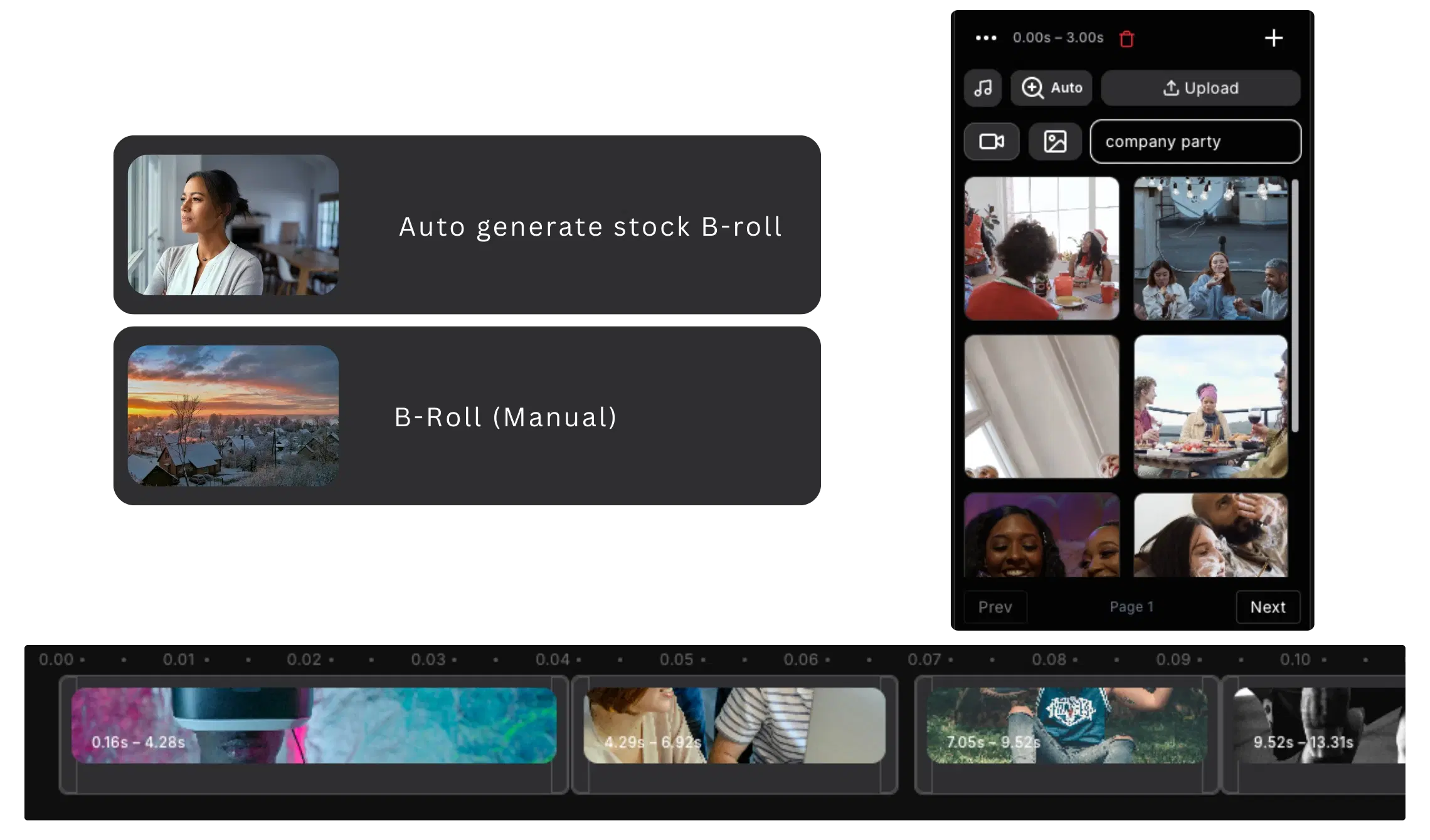
Bytecap's auto B-roll generator is built into our AI video editor. Our system analyzes your video's script, captions, or audio content and automatically searches stock footage libraries like Pexels for contextually relevant footage. It then cuts clips to the right length, applies smooth transitions, and syncs them to your timeline—all automatically.
B-roll is critical for professional-looking videos. Adding relevant stock footage increases viewer engagement by 35%, boosts retention time, and makes low-budget videos look expensive and professional. Creators without B-roll struggle with visual monotony. With auto B-roll insertion, every video looks professionally produced.
Manual B-roll insertion is extremely time-consuming. For each video, you need to: listen/read through content to identify where B-roll fits, search multiple stock footage websites (Pexels, Unsplash, Pixabay, Getty), download clips, check licensing, sync timing to your main content, cut clips to fit, add transitions, and render. A 10-minute video might require 2-3 hours of B-roll work.
Stock footage websites charge per-clip or per-month subscriptions ($25-100+/month). You need multiple subscriptions to access enough footage variety. Many creators skip B-roll entirely to save time, resulting in boring, low-engagement videos with high dropout rates. Videos without B-roll perform 35% worse than videos with matching stock footage.
Finding contextually appropriate B-roll is also difficult. Manual searches often return irrelevant footage. You need domain knowledge to identify which clips actually match your content's context. Bytecap's auto B-roll generator solves this by using AI to understand your content and find perfectly matching footage automatically.
Step 1: Analyze Your Content — Bytecap reads your script, captions, or analyzes your audio to understand what your video is about. Our AI identifies key topics and concepts that need visual support.
Step 2: Search Stock Footage — Our AI automatically searches Pexels and other stock libraries for footage matching your content's context. The search is semantic—it understands meaning, not just keywords.
Step 3: Select Best Matches — The AI ranks footage by relevance and visual quality. It selects the best clips that match your content's tone and visual style.
Step 4: Cut & Sync Automatically — B-roll clips are automatically cut to the right length, synced to your timeline, and positioned where they fit best. Transitions are applied automatically.
Step 5: Review & Customize — You can review all inserted B-roll, swap clips if you prefer different footage, adjust timing, or remove any clips you don't want. Full customization available.
AI reads your script/captions to understand context
Semantic search across Pexels and stock libraries
AI ranks footage by relevance and quality
Clips trimmed and synced to your timeline
Swap clips, adjust timing, full control
B-roll perfectly synced to your content
AI understands your content's meaning, not just keywords. It finds B-roll that matches your message and tone perfectly.
Searches Pexels and stock footage libraries automatically. Finds contextually relevant clips without manual searching.
Clips are automatically trimmed to fit your timeline. Perfect timing sync between B-roll and your main content.
Smooth transitions applied automatically between B-roll and main footage. Professional look without manual editing.
Layer B-roll over voiceovers, captions, and graphics. Full customization of opacity and positioning.
Auto B-roll is just the starting point. Swap clips, adjust timing, or remove footage you don't need.
Increase in viewer engagement with B-roll
Higher completion rate vs videos without B-roll
B-roll licensing costs with AI automation
Time saved vs manual B-roll insertion
Upload your video with script or captions. AI analyzes content to understand what B-roll you need.
Automatically searches stock footage, selects matching clips, cuts them, and syncs to your timeline.
Review inserted B-roll, swap clips if needed, adjust timing, and export your professional video.
Full editing suite with B-roll generator built-in
Add subtitles to pair with B-roll footage
Extract short clips to use as B-roll material
Create B-roll-powered short-form content
Add B-roll to TikTok videos automatically
Bring your long-form footage into one workspace for clipping, editing, captions, and publishing.
Get Started NowTry for free