Bytecap
Bytecap
Automatically highlight the most important words in your video captions. AI detects hooks, punchlines, and calls-to-action with one toggle. Customize colors and boost engagement by 138%. No editing required.
40,000+ creators using AI to highlight captions automatically


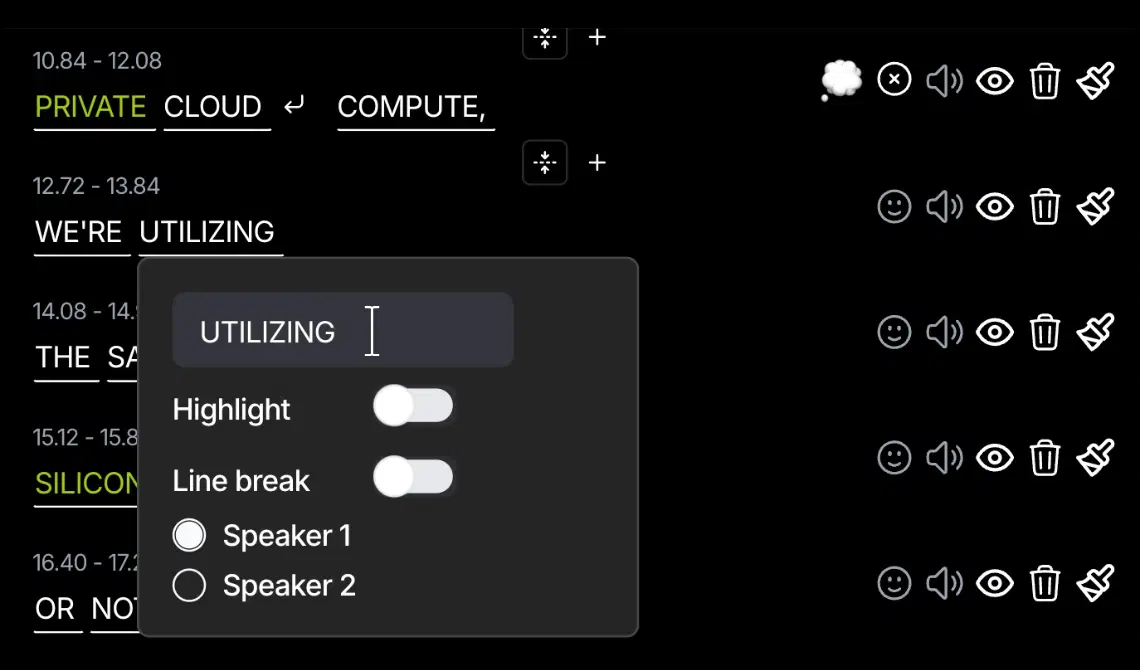
Auto Highlight Keywords is an AI-powered feature that automatically detects and highlights the most important words in your video captions. Instead of manually selecting which words matter, the AI analyzes your script and identifies the hooks, punchlines, key information, and calls-to-action that deserve visual emphasis.
One simple toggle activates automatic highlighting across your entire video. The AI understands context and intent, not just keywords. Your viewers' eyes are guided to exactly where they need to focus, making every word count and every message land harder.
Highlighted captions drive 138% more engagement. When key words pop visually, viewers retain information better, stay engaged longer, and are more likely to take action. Auto Highlight Keywords transforms passive text into active visual storytelling.
Customize everything: change highlight colors to match your brand, adjust opacity, choose bold or italic emphasis, and control which word types get highlighted. The AI handles the detection—you control the style.
Most creators publish captions without any emphasis. Plain text is boring. Your viewers scan rather than read, missing the most important parts of your message. This drives higher dropout rates, lower completion percentages, and less engagement overall.
Manual highlighting requires clicking on individual words and changing colors for every single caption. For a 5-minute video with 50+ captions, that's 100+ clicks and color changes. You're manually deciding which words matter when you should be focusing on storytelling. This takes 30-60 minutes per video.
Even worse, you often miss the most impactful moments. You highlight the obvious keywords but miss the emotional hooks and subtle punchlines that actually drive engagement. Your highlighting becomes inconsistent and ineffective.
Auto Highlight Keywords solves this by using AI to identify what matters and automatically emphasize it. One toggle handles it all.
Step 1: Upload Your Video — Load your video with captions (auto-generated or custom) into the editor.
Step 2: Toggle Auto Highlight — Click the "Auto Highlight" toggle. The AI instantly scans your captions and identifies the most important words.
Step 3: AI Analyzes & Emphasizes — The system detects hooks, key information, emotional words, questions, and calls-to-action. All important words are automatically highlighted.
Step 4: Customize Colors & Style — Choose your highlight color to match your brand. Adjust opacity, font weight, and emphasis style (bold, italic, underline, background color).
Step 5: Review & Fine-Tune — Preview how your highlighted captions look. Manually adjust any highlights if needed, or let AI handle it completely.
Load video with captions into the editor
One click activates AI scanning
Detects hooks, key info, emotions, CTAs
Match your brand with custom colors
Preview and adjust highlights as needed
138% more engagement with emphasized words
Toggle auto highlight on and watch your captions instantly emphasize the most important words.
Advanced AI understands context and intent to identify hooks, punchlines, key information, and CTAs.
Choose any highlight color to match your brand. Customize opacity, font weight, and emphasis style.
Highlighted words draw attention and guide viewers through your message, increasing retention.
AI identifies emotional words, questions, and calls-to-action that deserve extra emphasis.
AI does the heavy lifting, but you can manually adjust any highlights or turn them off selectively.
More engagement with highlighted captions
Increased watch time with visual emphasis
All you need to highlight your entire video
Customize highlights to match your brand
Load your video into Bytecap. Auto-generate captions or upload your own.
Click the Auto Highlight button. AI instantly scans and highlights important words.
Choose your colors, adjust styles, review results, and export your highlighted video.
Create perfect captions before highlighting them
Full editing suite with highlighting built-in
Pair highlighted captions with viral titles
Create Shorts with highlighted captions
Make TikToks with emphasis and style
Pair B-roll with highlighted captions for impact
Start creating viral TikToks, Instagram Reels & YouTube Shorts today!