How to Choose an AI Video Clipping Platform in 2026
A practical 2026 checklist for choosing an AI video clipping platform. Learn how to evaluate clip quality, captions, reframing, editing, pricing limits, collaboration, and publishing with your own footage.
By Ali Mansour
Quick answer
Choose an AI video clipping platform by measuring approved clips per hour of review, not the number of clips it generates or the size of its feature list. Start with the type of footage you make, then test how each tool handles moment selection, captions, vertical framing, cleanup, collaboration, and the final path to publishing.
For a complete long-video-to-short-form workflow, Bytecap is a strong option to test. For a focused clip-first workflow, OpusClip and Klap are relevant candidates. For collaboration and social distribution, Vizard is worth evaluating. For transcript-centered production, Descript may fit. For fully manual creative control, use a traditional timeline editor such as CapCut alongside the clipping workflow.
Start with the job, not the brand
"AI clipper" can describe very different products. Some primarily find short moments in a long recording. Others add captions and vertical reframing. Others include editing, collaboration, templates, publishing, and scheduling. A tool can be excellent and still fail your workflow if it solves the wrong job.
Write down the one task that currently consumes the most time:
| Your bottleneck | What to prioritize |
|---|---|
| Scrubbing long recordings for good moments | Clip selection, source imports, first-pass quality |
| Fixing caption errors and line breaks | Transcript controls, word timing, styling, translation needs |
| Turning horizontal footage into vertical posts | Speaker or subject tracking, layouts, crop controls |
| Making clips look on-brand | Templates, fonts, colors, visual layers, easy manual edits |
| Moving work through a team | Shared workspace, review process, role access, brand controls |
| Posting consistently | Exports, platform support, approvals, scheduling, reporting workflow |
This exercise prevents a common mistake: buying a feature-rich product because its demo looks impressive, then discovering the team still spends most of its time in another tool.
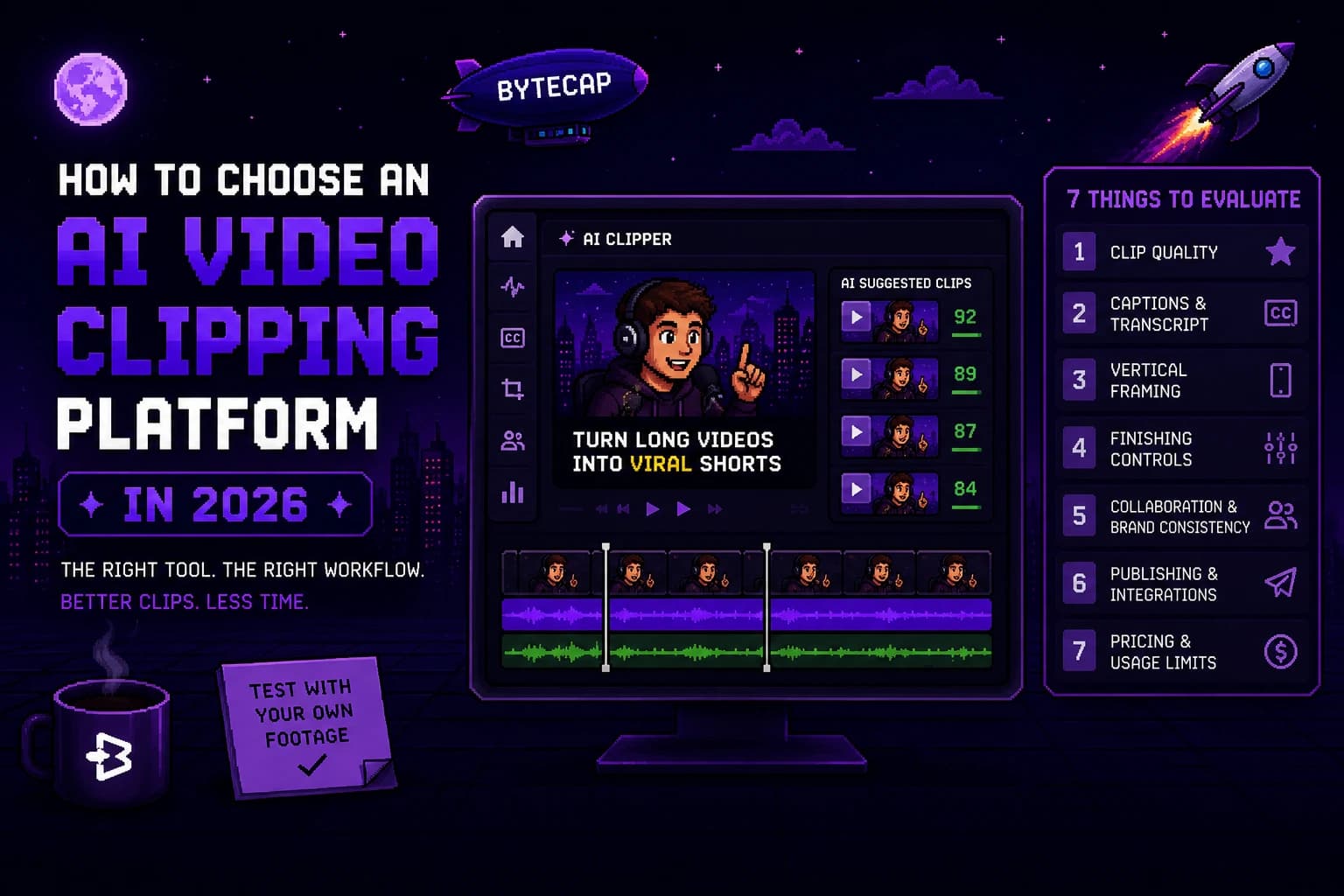
The seven criteria that matter
1. Source footage compatibility
Confirm that the platform accepts the media you actually create. That may include uploads, YouTube links, podcast recordings, webinars, cloud files, livestream replays, or screen recordings. Also check maximum upload length, file-size limits, supported resolutions, and how usage credits are counted.
Do not test only a clean studio podcast if your normal source is a noisy Zoom call. The platform must work on your ordinary footage, not only your best footage.
2. Moment selection quality
Ask whether a suggested clip has a complete thought, a clear first few seconds, and enough context for a viewer who never saw the long video. A high clip count can be a warning sign when it creates a giant review queue.
Score each candidate from 1 to 5 for:
- A clear hook or visual reason to watch.
- A beginning that makes sense without explanation.
- A satisfying end rather than an abrupt cutoff.
- Relevance to the channel and intended audience.
- Likelihood that you would actually publish it.
Treat a tool's virality or quality score as a sorting hint, not a publishing decision.
3. Captions and transcript control
Automated captions can save substantial time, but only if you can correct names, terminology, punctuation, speaker changes, timing, and line breaks quickly. Check the captions with sound off on a phone. If they cover the product, gameplay, or a speaker's face, they are not doing their job.
Ask:
- Are captions word-timed or easy to retime?
- Can you edit the transcript without fighting a timeline?
- Can you use your own style and make key words readable without overdesigning every line?
- Does the tool support the languages your audience actually needs?
4. Vertical framing and layouts
Most source recordings are horizontal, while TikTok, Reels, and Shorts are usually vertical. The crop needs to preserve the part of the screen that gives the clip meaning. For a podcast, that might be the active speaker. For a product demo, it might be the interface. For gameplay, it could be the action, HUD, and face cam.
Test a two-person conversation, a screen share, and a clip with fast movement. Make sure you can override the AI crop and choose a layout when the automatic frame gets it wrong.
5. Finishing controls
The first generated clip is almost never the final version. Look for the fixes that repeatedly matter in your work: trim handles, caption editing, crop controls, visual layers, B-roll, audio, cover or thumbnail tools, templates, and text controls.
The goal is not to collect every effect. It is to avoid exporting to another app for the same three corrections every time.
6. Collaboration and brand consistency
For agencies and teams, a single creator's demo is not enough. Test the handoff between the person who generates a clip, the person who edits it, the person who reviews it, and the person who publishes it. Confirm that templates, fonts, colors, and source files do not need to be recreated in every project.
Document the approval process before you purchase. A tool cannot fix a vague review workflow.
7. Publishing and usage economics
Pricing is more than the subscription number. Some platforms use upload minutes, credits, exports, seats, storage, social accounts, or processing priority. Those limits can make one plan cheap for a weekly creator and expensive for an agency with many client recordings.
Calculate the plan against a normal month:
monthly source minutes x expected reprocessing rate x number of channels or users
Then check the official plan page for what the current allowance includes. Do not rely on an old comparison article or a screenshot of a pricing page.
A 60-minute trial plan
You can make a responsible shortlist in one hour.
- Select a representative 30- to 60-minute source video.
- Run it through two or three platforms with broadly comparable default settings.
- Keep only the clips that would be publishable after a normal review.
- Finish three clips in each platform: correct captions, adjust the crop, make any needed visual edit, and prepare the post.
- Record the total time and number of approved clips.
- Repeat with a second source type if your channel mixes formats.
Use this scorecard:
| Measure | How to record it |
|---|---|
| Approved candidates | Clips you would genuinely publish after a quick review |
| Cleanup minutes | Time spent fixing captions, crops, trims, and layout |
| Handoffs | Number of times a file or task must move to another tool or person |
| Context failures | Clips that need the original video to make sense |
| Publishing readiness | Whether an approved video can move to your normal posting process cleanly |
The useful number is: total review and finishing minutes / approved clips. Compare that number across tools before choosing a plan.
Common mistakes to avoid
Choosing by clip count
Thirty generated clips are not better than six if only two are usable. Count approved, context-rich clips, not raw output.
Ignoring visual footage
Speech-focused AI can be strong for a podcast and weak for gameplay, sports, product demos, or footage where the key moment is visual. Test each type of content you publish.
Skipping the mobile check
Review a vertical clip on a phone with sound off. This is where bad caption placement, tiny UI, awkward crops, and crowded layouts reveal themselves.
Treating AI output as final
AI can create a draft quickly, but it does not know your community context, brand standards, rights, or which promise is appropriate for a headline. Keep human review in the workflow.
Optimizing price before workflow
Compare usage limits after you know which tool creates the most approved output. A lower starting price is not a saving if it adds hours of cleanup or forces you to pay for several disconnected services.
Which platform type fits you?
| If you are... | Start by testing | Why |
|---|---|---|
| A podcaster or educator | Bytecap, Descript, OpusClip, Klap | Spoken content benefits from clip selection, captions, and transcript control |
| A streamer or gaming creator | Stream-focused tools plus Bytecap | Visual context and custom vertical layouts need a dedicated test |
| A solo short-form creator | Bytecap and CapCut | Compare automation against hands-on creative control |
| A marketing team | Bytecap and Vizard | Look closely at collaboration, brand consistency, and publishing flow |
| An agency | Bytecap, Vizard, and your existing editor | Test the complete client review and approval workflow |
Frequently Asked Questions
What should I look for in an AI video clipper?
Look for your biggest bottleneck first: clip selection, captions, reframing, editing, collaboration, or publishing. Then test the platform with your own footage and measure approved clips per hour of review.
Is an AI video clipper worth it?
It is worth it when it reduces repetitive review and finishing work without lowering the quality of what you publish. A short trial with a representative source video is the best way to find out.
How do AI clipping platforms charge for usage?
Models vary. Plans may use uploaded minutes, credits, exports, seats, storage, social accounts, or processing allowances. Check the current official pricing page and calculate the cost against your normal monthly source volume.
Should agencies use an AI clipping platform?
Agencies can benefit when the platform reduces handoffs and keeps brand assets, review, edits, and publishing organized. Test the workflow with a client-style project and include the actual editors, reviewers, and account managers in the trial.
Sources checked
- Bytecap Magic Clips and Bytecap AI Video Editor
- OpusClip plans and credits
- Klap AI Clip Maker and Klap pricing
- Vizard Video Editor and Vizard pricing
- Descript pricing and feature overview
- CapCut video editing software
Bottom line
Choose an AI video clipping platform with a real-footage test and a simple operational metric: approved clips per hour of review. Use a focused clipper when highlight discovery is the only gap. Use a complete tool such as Bytecap when the same workflow also needs captions, reframing, editing, and publishing. Let the actual time from source footage to an approved post make the decision.